
Execution Authorization
The authority layer for AI
AI systems can generate actions. TrigGuard determines whether those actions are allowed to become reality.
Core concept
Authority before execution
Not who can access the system, what is allowed to happen next.
- Identity answers who can authenticate.
- Policy answers what rules exist.
- Execution Authorization answers what may happen next, before it happens.
The shift
Observe after vs control before
Traditional security detects compromise after execution. Execution Authorization controls whether irreversible actions proceed at all.
Logs, SIEM, and audits tell you what already happened. Incident response starts after the damage.
- Detects after execution
- Post-hoc incident response
- Evidence from log pipelines
Every irreversible action passes through authorization. No receipt, no execution. Fail-closed by default.
- Controls before execution
- Real-time policy enforcement
- Cryptographic proof per decision
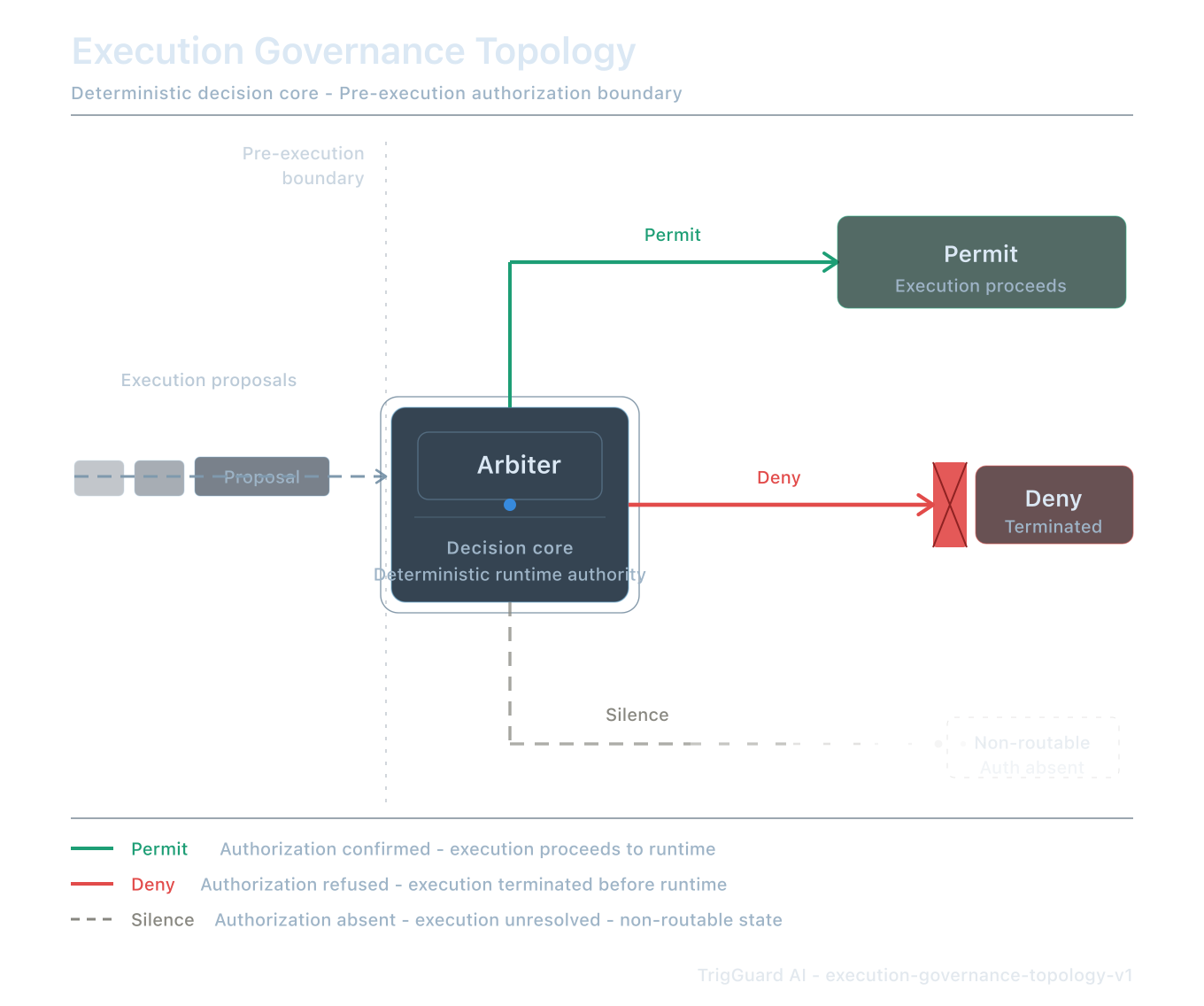
Runtime governance topology
Permit, deny, and silence at the execution boundary
Every execution proposal passes through a deterministic decision core. Authorization must be explicit before runtime proceeds.
- Permit - authorization confirmed; execution proceeds to runtime.
- Deny - authorization refused; execution terminated before runtime.
- Silence - authorization absent; execution is non-routable (fail-closed).
Protocol path
From intent to permitted execution
Every action follows a deterministic, cryptographically anchored path. Not a workflow, a protocol.
-
Action proposed
SDK intercepts the call before runtime executes.
Exampledeploy.release -
Authority requested
Context sent to Gate with action identity and intent.
Actor ci-bot Intent production deployment -
Policy evaluated
Arbiter checks against active policy bundles.
Bundle deploy-governance@v2 Rule approval-chain.required -
Decision issued
PERMIT, DENY, or ESCALATE , deterministic.
Deny Missing approval chain -
Receipt generated
Ed25519-signed proof bound to the decision.
Receipt tg_82fj31 · Ed25519 -
Execution permitted
Action proceeds only with valid receipt signature.
Status Blocked - fail-closed
Authority outcomes
Four outcomes. One gate.
People remember outcomes, not terminology. Every evaluation resolves to exactly one authority decision.
- Permit Action authorized. Execution may proceed with receipt.
- Deny Action blocked. SDK rejects with explicit reason and evidence.
- Escalate Human approval required before execution can proceed.
- Silence No authority issued. Passive logging only, execution remains blocked.
Category creation
Why this category exists
A new control plane for actions
Every era of infrastructure created a control plane for a new class of risk. Execution Authorization is the layer for autonomous action.
- Firewalls control packets
- Identity controls users
- Execution Authorization controls actions
The next control plane
As AI systems become capable of deploying infrastructure, moving money, modifying data, and operating autonomously, authorization moves from users to actions.
Every AI company building agents that touch production will need an authority layer. This is not optional infrastructure, it is inevitable.
Verification
Cryptographic proof
Every authorized action generates a receipt, an Ed25519-signed attestation verifiable offline by any audit tool.
{
 "receipt_id": "rcpt_7v2k...",
 "action": "db.write",
 "decision": "PERMIT",
 "issuer": "TrigGuard-Gate-01",
 "signature": "3a9c7b2e..."
}
Authorization is not a log line. Each decision produces cryptographically signed proof, audit-ready and independently verifiable against published keys.
Explore receipt schemaCategory leadership
Execution Authorization is inevitable.
TrigGuard is building the infrastructure category that every AI company will need, authority before execution, with cryptographic proof.